There's a popular post going around about Alibaba doing WebAudio fingerprinting and in the process, mucking around with the author's Bluetooth headphones. Here's the tl;dr: browser fingerprinting is a far-too-pervasive method of tracking users across the web, but at least for WebAudio specifically, it's not very effective. Firefox has largely eliminated this fingerprinting vector.
I work on Firefox. Chrome, Brave, Safari probably have defenses against this. I'm pretty sure Chrome's WebAudio code was made approximately constant (like ours) many years ago. It probably still leaks CPU architecture though.
I don't fully agree with the adage "given enough eyeballs, all bugs are shallow" - I think a more true one might be "given enough victims, your attack code is going to change something that makes someone notice". And that's exactly what happened with... sorry, wrong link. That's exactly what happened with Alibaba's fingerprinting code.
If you want to test Alibaba's WebAudio fingerprint, I had claude extract it into a standalone page. My value is sha256:9a388c0dd04cfdc54314f9d961c7e2d247b972067e28d1cea76bd6060cf1392e, and the other value we saw in an internal survey was sha256:16d3191880ce01f726015ec6a1f9a072a81ebd04bf489098d4685d1d1c0b2711.
WebAudio Fingerprinting in Firefox
We made the WebAudio constant in Firefox 118 three years ago as part of our initial round of Fingerprinting Protection features. This eliminated most of the differences.
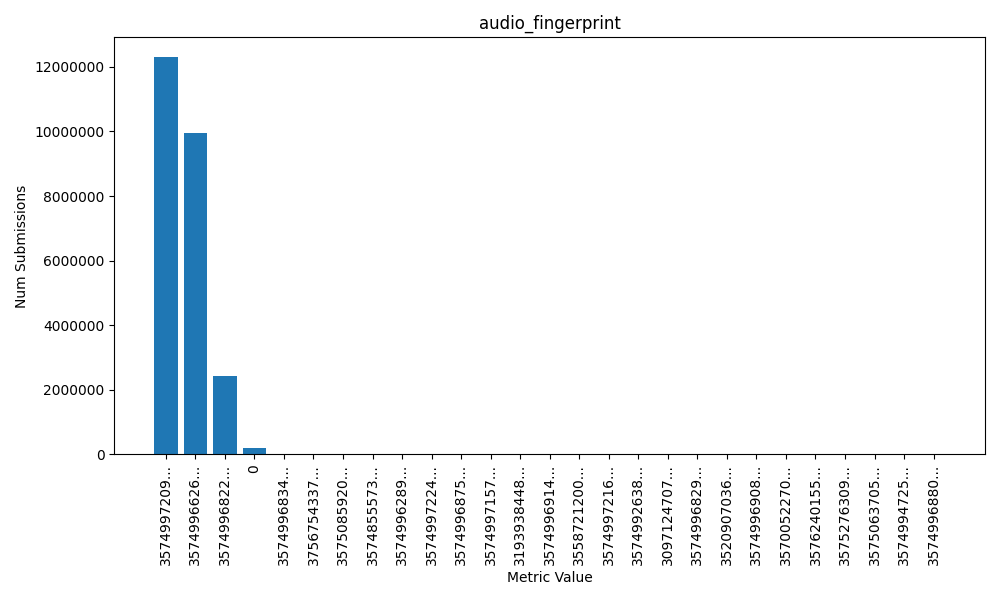
99.24% of users belong to one of three values, and .76% of users had that data collection point fail (a value of zero.) So virtually all users have one of these three values but why are there three values??? Why isn't there one?? Well this is why we collected this telemetry - to ensure we really had made things constant the way we thought we had, and if we hadn't, figure out why and fix it.
The improvements we put into 118 eliminated a lot of differences and I wish I had a graph I could show you of what it looked like before (but I don't.) But what about these remaining three buckets? We were able to figure out that the differences between these are CPU-level differences, which is not surprising given the math operations of audio processing. Specifically one value comes from (all) x86 CPUs and x64 CPUs that lack fused multiply-add instructions, one value from x64 with FMA, and one value from CPUs with the NEON instruction set (ARM).
We followed up on that effort to collapse these buckets into one another. Bug 2036977 collapses the x64 (with FMA3) into the x86/x64 (without FMA3) bucket. Bug 2040494 is on file to collapse the remaining bucket into the NEON bucket but I haven't worked on it in a while because it's just not as high a priority as larger improvements we can make like Sanitizing the WebGL Renderer and Vendor (something I talked a bit about a few months ago).
Because if you've read this far you surely care about the rest of the graph also. There is also the long-tail of 23 other values belonging to 48 other users. This is very unfortunate, as it makes these users completely unique, but it is also not terribly unusual - computers are weird and these results could have been caused by bad RAM, a CPU bug, or possibly some crazy architecture (LoongArch??).
But at the end of the day, WebAudio fingerprinting is nearly useless. I don't expect browser fingerprinting to disappear from websites entirely (unless some regulatory action occurs, fingers crossed) - it's still going to be effective against a majority of users on the web, but at least for privacy focused browsers, it should be wildly less effective.
WebGL exposes the details of your graphics hardware (specifically, the string that describes the rendering engine) in 2 ways. There are three levels of protection that browsers have taken to protect this data.
gl.getParameter(gl.VENDOR)andgl.getParameter(gl.RENDERER)- these are the 'simple' names. At some point in the past, someone argued that it wasn't enough information, and therefore we have a second API-
let ext = gl.getExtension('WEBGL_debug_renderer_info');and thengl.getParameter(ext.UNMASKED_VENDOR_WEBGL)andgl.getParameter(ext.UNMASKED_RENDERER_WEBGL)
The unmasked values are intended to be the more detailed ones, so always make sure you're comparing apples to apples. Another axis is that WebGL can render with Hardware or Software. This isn't a guarentee which one you'll get, but you can hint towards one or the other and the browser may or may not respect it. Here are your values:
Alright, now let's talk about what browsers do about it. There's no point in talking about Vendor, Renderer, and Unmasked Vendor - they don't really show as much detailed info, it's all about Unmasked Renderer. There are three levels:
- Give a constant value. (Or don't return anything at all.)
- 'Round' the values into buckets
- Give the exact value back
Safari and Tor Browser give constant values.
Firefox 'rounds'.
Chrome (and Brave, and I assume all-ish other Chrome-based browsers) give the exact value.
Firefox actually is purusing constant values, this week. I wrote this document for our QA team to test it. (You can get a sense of the internal sausage making it takes to launch a privacy feature from it.) I don't know if you can see the dates but I made it May 20th. The problem is this - websites use this data legitimately to adjust behavior so that users get the best experience possible. I found one example where they detect a buggy graphics stack; and a couple of examples where they adjust rendering so things are more performant for users with lower end machines - a problem Apple has less to worry about because they only support certain machine models!
A common response to this seems to be ambivalence, and I would suggest that is a bit elitist. Yes, if you're caring about the details reveal by a particular Web API you probably have a computer where you don't need to worry, but making the web work well for everyone is important for equitable access to improving everyone's human condition.
We have been bucketing WebGL Renderer since 2021. While many of our (supported, on-by-default) fingerprinting protections are part of Enhanced Tracking Protection - rolling out first in PBM/ETP Strict before making it to ETP Standard/Normal Browsing Mode - the bucketing is on by default, for everyone, and is not disabled if ETP is disabled.
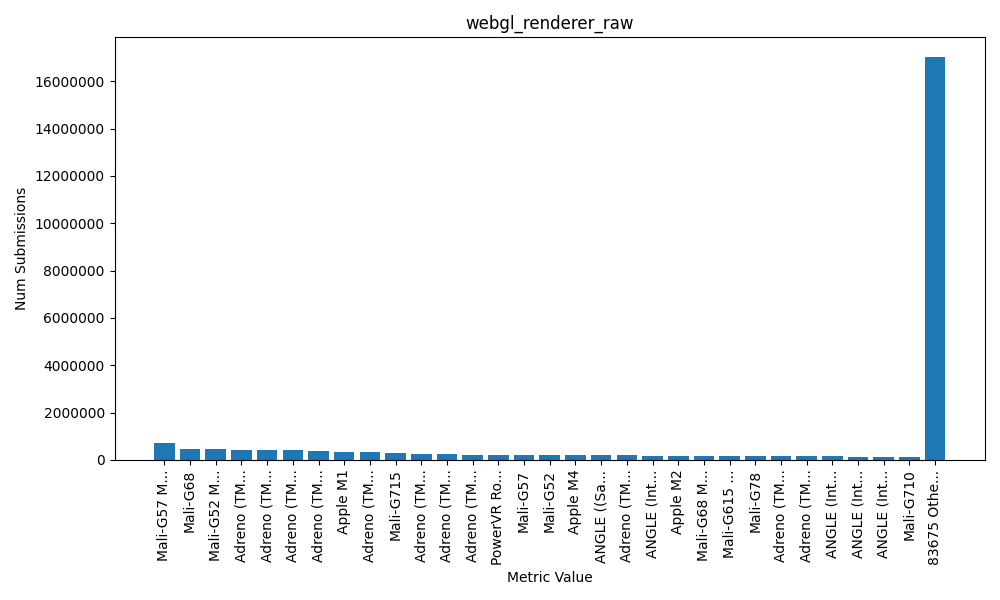
How much of a difference does it make? A lot! Here is the distribution of the raw values. 83,705 distinct values.
Compare that to the bucketed data. 131 distinct values.
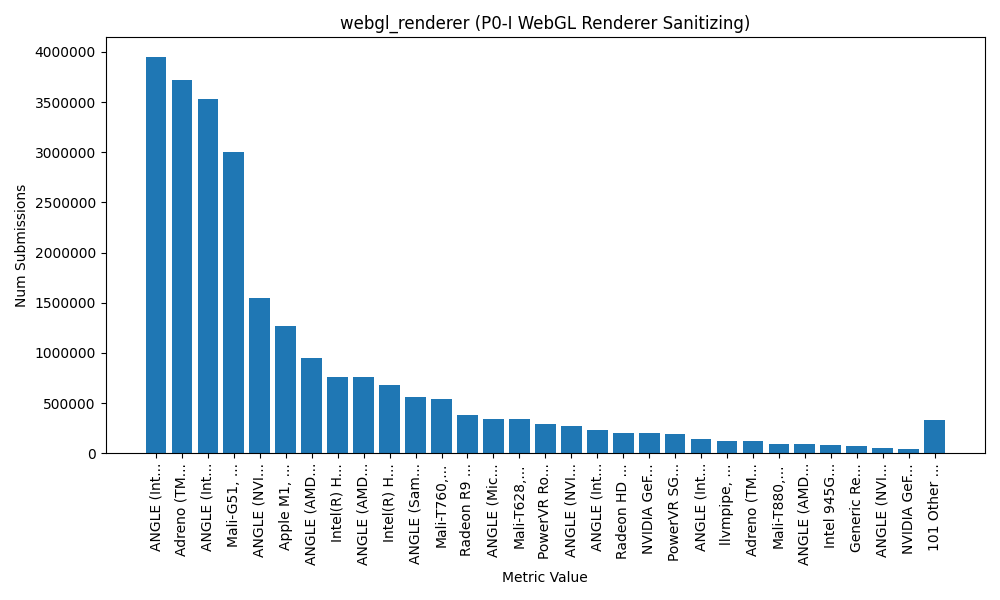
Now this data is from Firefox, so I cant say conclusively what the distribution of data is in other browsers, but... yeah. To claim Chrome (of all browsers!) is doing this better than us is pure FUD. We're making a big impact in how fingerprintable you are today and we're trying to improve it even further.
Let me start with this: it is your right to disable telemetry. I fully support that right, and in many cases I disable telemetry myself. If your threat model says "nope", or you simply don't like it, flip the switch. Your relationship with the software and the author of it is a great guide for whether you want to enable telemetry.
What I don't buy is the claim I keep seeing that telemetry is useless and doesn't actually help. I can only speak to Firefox telemetry, but I presume the lesson generalizes. Telemetry has paid for itself many times over on the technical side - stability, security, performance, and rollout safety. If you trust the publisher and want to help them improve the thing you use every day, turning on telemetry is the lowest-effort way to do it. If you don't trust them, or just don't want to... cool.
But be forewarned - if you're one of a very few people doing a very weird thing, we won't even know we need to support that thing. (More on that later.)
What I mean (and don't mean) by "telemetry"
Telemetry is a catch-all for measurements and signals a program sends home. In browsers that includes "technical and interaction data" (performance, feature usage, hardware basics), plus things like crash reports that are often controlled by a separate checkbox. To me, telemetry is things you send to the publisher and you don't directly receive anything in return.
In contrast, there are lots of other phone-home things I wouldn't call telemetry. Software update pings, for example. The publisher can derive data about this - in fact it's one of the only things Tor Browser 'collects' - but the purpose isn't to tell the publisher something, it's to get you the latest version and that's a direct benefit you gain. Firefox obviously has update pings, but it also has something called Remote Settings which is a tool to sync data to your browser for lots of other useful things. You phone home to get this data. Here's the list of collections, and here's a random one (it's overrides for the password autofill to fix certain websites). Overall it's stuff like graphics driver blocklists, addon blocklists, certificate blocklists, data for CRLite, exemptions to tracking protection to unbreak sites, and so on.
And then finally there are things that seem like gratuitous phoning home that I also don't consider telemetry. I don't know the status of all these features and if they still exist, or under what circumstances they happen, but these are things like pinging a known-good website to determine if you're under a captive portal, or roughtime to figure out if all your cert validation is going to break.
Now even for Telemetry - I'm not going to talk about product decisions like "is anyone clicking this button?" Those exist, sure, but they're not my world most days. I don't have any personal success stories from that world - I deal with technical telemetry - the kind that finds crashes and hangs, proves that risky security changes won't brick Nightly, and helps us pick the fastest safe implementation.
And I'm also not going to argue that you should trust Firefox's telemetry. I think you should make an informed decision - but if you're informed about what we collect (and all the mish-mash of data review approvals); how we collect it including 'regular telemetry' (discards your IP immediately), OHTTP (we never see your IP), Prio (privacy preserving calculations); and how we store it (automatic deletion of old data, segmented and unlinked datasets, etc) - and you still think we aren't doing enough to preserve your privacy... Well I can't argue with that. We aren't the absolute best in the world; we're far from the worst. And if we don't meet your threshold, turn it off.
But my point is: it's not pointless. It's not useless. It helps. It's shipped features you rely on.
As a super simple example you can easily poke at yourself - Mozilla's Background Hang Reporter (BHR) exists specifically to collect stacks during hangs on pre-release channels so engineers can find and fix the slow paths. That's telemetry.
Concrete wins from Firefox Telemetry (just from me)
This is a tiny slice from one developer. There are hundreds more across the project.
- Killing eval in the parent process (1473549)
-
Eval is bad, right? It can lead to XSS attacks, and when your browser process is (partially) written with JavaScript - that can be a sandbox escape. We tried to eliminate eval in the parent (UI) process, shipped it to Nightly, and immediately broke Nightly. The entire test suite was green and Mozillians had dogfooded the feature for weeks... and it still blew up on real users with real customizations. We had to revert fast and spin a new build. It was a pretty big incident, and not a good day. So we re-did our entire approach here and put in several rounds of extensive telemetry.
That told us where eval was still happening in the wild, including Mozilla code paths we didn't have tests for and, crucially, a thriving community of Firefox tinkerers using userChromeJS and friends. Because telemetry surfaced those scripts, I could go talk to that community, explain the upcoming change, and work around the breakages. See the public thread on the firefox-scripts repo for a flavor of that conversation. There's no way we could have safely shipped this without telemetry, and certainly no way we could have preserved your ability to hack Firefox to do what you want.
- Background Hang Reporter saved me from myself (1721840)
-
BHR data showed specific interactions where my code hung - no apparent reason, never would have guessed. I refactored, and the hang graphs dropped. That feedback loop doesn't exist without telemetry being on in pre-release.
- Fission (site isolation) and data minimization (1708798)
-
Chrome has focused a lot on removing cross origin data from content processes, as well as the IPC security boundary for cross origin data retrieval. Coming from Tor Browser (where I am also a developer, although not too active) - I was also pretty concerned with personal user data unrelated to origin data. Stuff like your printer or device name. As part of Fission, I worked to eliminate both cross-origin data and personally identifiable things from the content process so a web process running a Spectre attack couldn't get those details. Telemetry helped us confirm we weren't breaking user workflows as we pulled those identifiers out.
- Ending internet-facing
jar:usage -
Years ago Firefox allowed
jar:URIs from web content, and the security model was... not great. Telemetry let us show that real-web usage was basically nonexistent, which made closing that attack surface from the web a no-brainer. - Same story brewing for XSLT
-
Chrome has been pushing to deprecate/remove XSLT in the browser due to security/maintenance risk and very low usage; I'm supportive. Usage telemetry is the only way we're able to justify removing a feature from the web.
- Picking the fastest safe canvas noise (1972586)
-
For anti-fingerprinting canvas noise generation, I used telemetry to measure which implementation was actually fastest across CPUs: it's SHA-256 if you have SHA extensions; SipHash if you don't - or if the input is under ~2.5KB. That choice matters when you multiply it by billions of calls.
- Font allowlist for anti-fingerprinting (Lists, 1795460)
-
Fonts are a huge fingerprinting vector. We built a font allowlist and font-visibility controls; by design, Firefox's fingerprinting protection avoids using your locally installed one-off fonts on the web. This dramatically shrinks the entropy of "which fonts do you have?" without breaking normal sites. While many browsers do this now, telemetry has helped us continue to improve these defenses and I'm pretty sure we're still the only one that has a font allowlist for Android.
- Reality check on Resist Fingerprinting users
-
Folks who manually enable our "Resist Fingerprinting" preference (which we don't officially support, and I don't generally recommend - but hey, you do you) are very loud on Bugzilla. VERY loud. To the point where I've had a lot of managers and executives come telling me "Everyone is complaining about this breaking stuff, we really need to disable this so people can't accidentally turn it on." Telemetry let me show that despite being SO LOUD they're still a minute portion of the population. Management's question "Should we block it?" became "No." You're welcome.
That's just my lane. People I work closely with used telemetry to:
- Ship CRLite (privacy-preserving certificate revocation that's finally practical). Telemetry was instrumental in making this happen.
- Roll out TLS features like Certificate Transparency support and HTTPS-First behavior, watching real-world fallout and compatibility.
- Tighten OS sandboxes. I've been working at Mozilla close to 10 years, and I vividly remember the days we lagged behind Chrome in how tight we had our sandbox. (We're on par now, if you didn't realize.) The only way we could do this was by continually running experiments and monitoring telemetry and crash reports as we identified more and more things we broke and needed to fix before we could ship it.
- Gabriele Svelto works in the stability and crash reporting team and has written extensively about the unexpected things he finds and diagnoses using crash reports.
I could give more examples, but I think you get the idea.
"I use Foo browser because it disables telemetry."
Every major browser either implements telemetry or outsources the job to the upstream engine, and benefits from their having it. Period. Even Brave does telemetry, and they're quite public about their design (P3A): collected into buckets/histograms with privacy techniques like shuffling/thresholding. That's a perfectly respectable approach.
We can debate the efficacy or privacy properties of different telemetry designs. We can both stand aghast at overcollection of things that shouldn't be collected. We can debate whether it should be opt-out or opt-in. But only if we both start from the position that telemetry isn't philosophically bad, it can just be implemented badly.
Every Foo browser that brags about disabling telemetry is relying on their upstream source - whether it's Firefox or Chrome - to improve the Foo browser using someone else's telemetry - all while trying to take this moral high ground.
If you want to use Foo because it adds features you like, or you trust its publisher to choose defaults more than upstream - those are completely valid reasons to use it. But if the reason is "Telemetry is just a way for Firefox to spy on me", hopefully I've dented that perception.
This article originally appeared on the Mozilla Hacks blog.
That shopping rabbit hole you started on your laptop this morning? Pick up where you left off on your phone tonight. That dinner recipe you discovered at lunchtime? Open it on your kitchen tablet, instantly. Connect your personal devices, securely. – Firefox Sync
Firefox Sync lets you share your bookmarks, browsing history, passwords and other browser data between different devices, and send tabs from one device to another. It’s a feature that millions of our users take advantage of to streamline their lives and how they interact with the web.
But on an Internet where sharing your data with a provider is the norm, we think it’s important to highlight the privacy aspects of Firefox Sync.
Firefox Sync by default protects all your synced data so Mozilla can’t read it. We built Sync this way because we put user privacy first. In this post, we take a closer look at some of the technical design choices we made and why.
When building a browser and implementing a sync service, we think it’s important to look at what one might call ‘Total Cost of Ownership’. Not just what users get from a feature, but what they give up in exchange for ease of use.
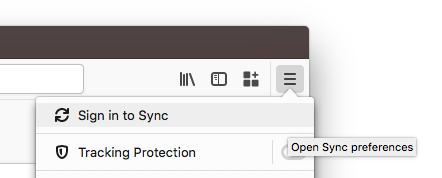
We believe that by making the right choices to protect your privacy, we’ve also lowered the barrier to trying out Sync. When you sign up and choose a strong passphrase, your data is protected from both attackers and from Mozilla, so you can try out Sync without worry. Give it a shot, it’s right up there in the menu bar!
Why Firefox Sync is safe
Encryption allows one to protect data so that it is entirely unreadable without the key used to encrypt it. The math behind encryption is strong, has been tested for decades, and every government in the world uses it to protect its most valuable secrets.
The hard part of encryption is that key. What key do you encrypt with, where does it come from, where is it stored, and how does it move between places? Lots of cloud providers claim they encrypt your data, and they do. But they also have the key! While the encryption is not meaningless, it is a small measure, and does not protect the data against the most concerning threats.
The encryption key is the essential element. The service provider must never receive it – even temporarily – and must never know it. When you sign into your Firefox Account, you enter a username and passphrase, which are sent to the server. How is it that we can claim to never know your encryption key if that’s all you ever provide us? The difference is in how we handle your passphrase.
A typical login flow for an internet service is to send your username and passphrase up to the server, where they hash it, compare it to a stored hash, and if correct, the server sends you your data. (Hashing refers to the activity of converting passwords into unreadable strings of characters impossible to revert.)
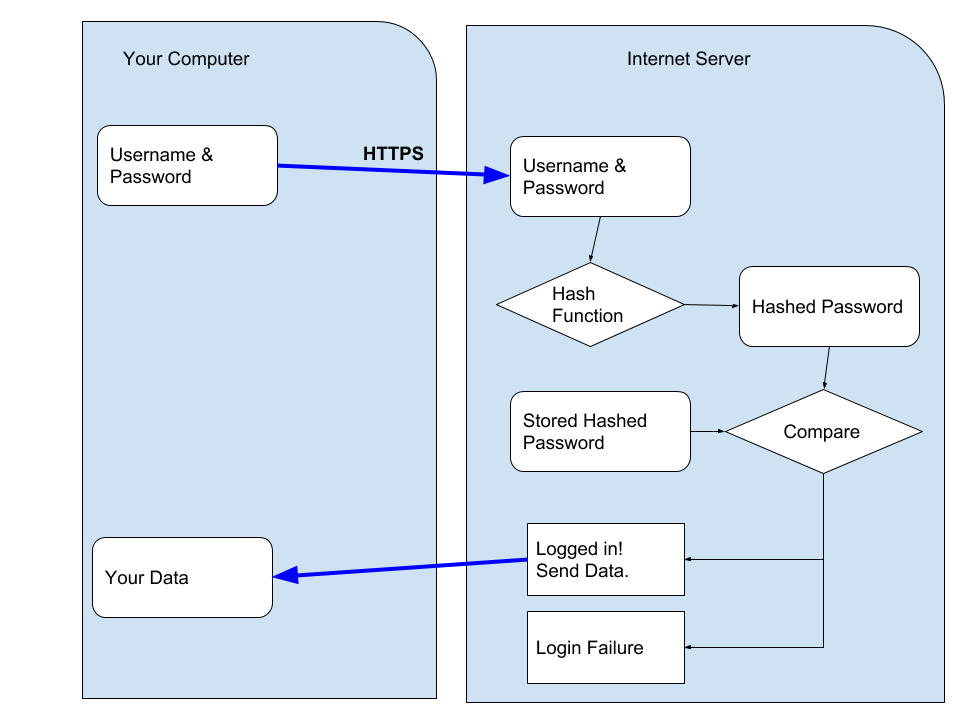
The crux of the difference in how we designed Firefox Accounts, and Firefox Sync (our underlying syncing service), is that you never send us your passphrase. We transform your passphrase on your computer into two different, unrelated values. With one value, you cannot derive the other0. We send an authentication token, derived from your passphrase, to the server as the password-equivalent. And the encryption key derived from your passphrase never leaves your computer.
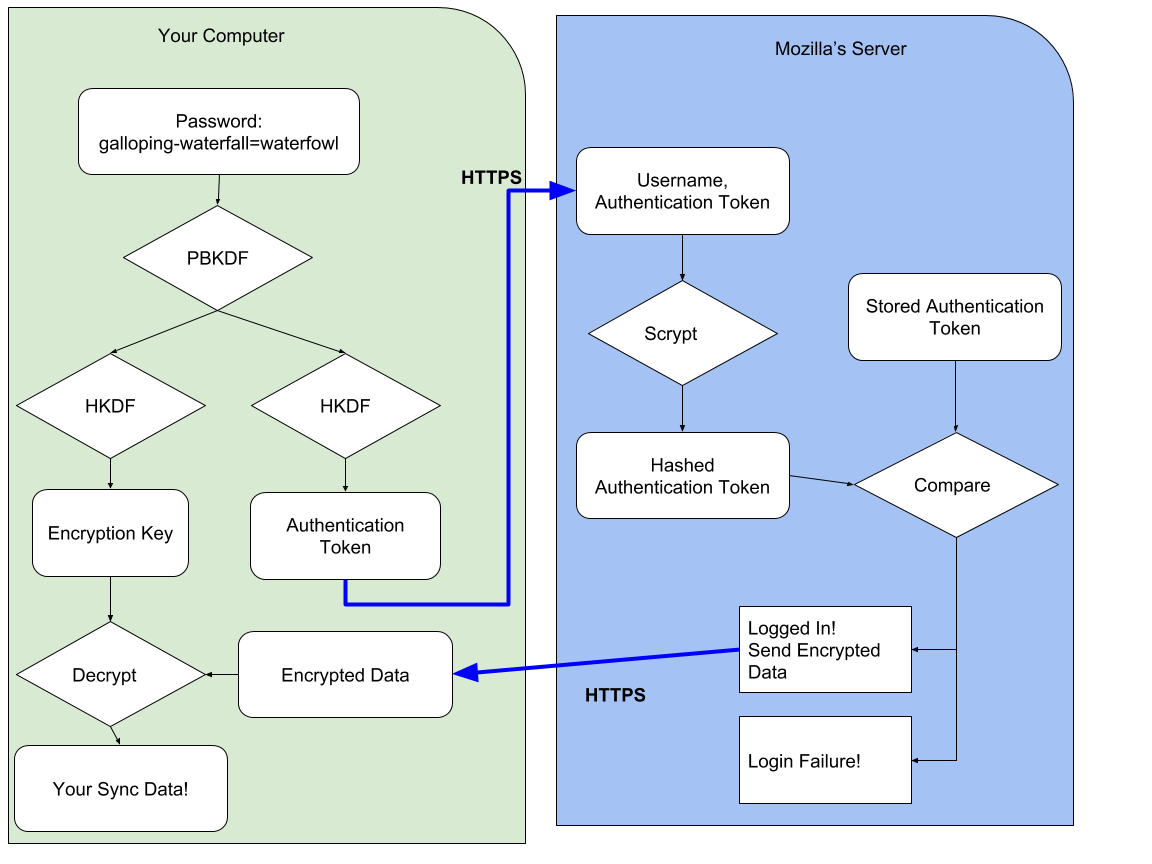
Interested in the technical details? We use 1000 rounds of PBKDF2 to derive your passphrase into the authentication token1. On the server, we additionally hash this token with scrypt (parameters N=65536, r=8, p=1)2 to make sure our database of authentication tokens is even more difficult to crack.
We derive your passphrase into an encryption key using the same 1000 rounds of PBKDF2. It is domain-separated from your authentication token by using HKDF with separate info values. We use this key to unwrap an encryption key (which you generated during setup and which we never see unwrapped), and that encryption key is used to protect your data. We use the key to encrypt your data using AES-256 in CBC mode, protected with an HMAC3.
This cryptographic design is solid – but the constants need to be updated. One thousand rounds of PBKDF can be improved, and we intend to do so in the future (Bug 1320222). This token is only ever sent over a HTTPS connection (with preloaded HPKP pins) and is not stored, so when we initially developed this and needed to support low-power, low-resources devices, a trade-off was made. AES-CBC + HMAC is acceptable – it would be nice to upgrade this to an authenticated mode sometime in the future.
Other approaches
This isn’t the only approach to building a browser sync feature. There are at least three other options:
Option 1: Share your data with the browser maker
In this approach, the browser maker is able to read your data, and use it to provide services to you. For example, when you sync your browser history in Chrome it will automatically go into your Web & App Activity unless you’ve changed the default settings. As Google Chrome Help explains, “Your activity may be used to personalize your experience on other Google products, like Search or ads. For example, you may see a news story recommended in your feed based on your Chrome history.”4
Option 2: Use a separate password for sign-in and encryption
We developed Firefox Sync to be as easy to use as possible, so we designed it from the ground up to derive an authentication token and an encryption key – and we never see the passphrase or the encryption key. One cannot safely derive an encryption key from a passphrase if the passphrase is sent to the server.
One could, however, add a second passphrase that is never sent to the server, and encrypt the data using that. Chrome provides this as a non-default option5. You can sign in to sync with your Google Account credentials; but you choose a separate passphrase to encrypt your data. It’s imperative you choose a separate passphrase though.
All-in-all, we don’t care for the design that requires a second passphrase. This approach is confusing to users. It’s very easy to choose the same (or similar) passphrase and negate the security of the design. It’s hard to determine which is more confusing: to require a second passphrase or to make it optional! Making it optional means it will be used very rarely. We don’t believe users should have to opt-in to privacy.
Option 3: Manual key synchronization
The key (pun intended) to auditing a cryptographic design is to ask about the key: “Where does it come from? Where does it go?” With the Firefox Sync design, you enter a passphrase of your choosing and it is used to derive an encryption key that never leaves your computer.
Another option for Sync is to remove user choice, and provide a passphrase for you (that never leaves your computer). This passphrase would be secure and unguessable – which is an advantage, but it would be near-impossible to remember – which is a disadvantage.
When you want to add a new device to sync to, you’d need your existing device nearby in order to manually read and type the passphrase into the new device. (You could also scan a QR code if your new device has a camera).
Other Browsers
Overall, Sync works the way it does because we feel it’s the best design choice. Options 1 and 2 don’t provide thorough user privacy protections by default. Option 3 results in lower user adoption and thus reduces the number of people we can help (more on this below).
As noted above, Chrome implements Option 1 by default, which means unless you change the settings before you enable sync, Google will see all of your browsing history and other data, and use it to market services to you. Chrome also implements Option 2 as an opt-in feature.
Opera and Vivaldi follow Chrome’s lead, implementing Option 1 by default and Option 2 as an opt-in feature. Update: Vivaldi actually prompts you for a separate password by default (Option 2), and allows you to opt-out and use your login password (Option 1).
Brave, also a privacy-focused browser, has implemented Option 3. And, in fact, Firefox also implemented a form of Option 3 in its original Sync Protocol, but we changed our design in April 2014 (Firefox 29) in response to user feedback6. For example, our original design (and Brave’s current design) makes it much harder to regain access to your data if you lose your device or it gets stolen. Passwords or passphrases make that experience substantially easier for the average user, and significantly increased Sync adoption by users.
Brave’s sync protocol has some interesting wrinkles7. One distinct minus is that you can’t change your passphrase, if it were to be stolen by malware. Another interesting wrinkle is that Brave does not keep track of how many or what types of devices you have. This is a nuanced security trade-off: having less information about the user is always desirable… The downside is that Brave can’t allow you to detect when a new device begins receiving your sync data or allow you to deauthorize it. We respect Brave’s decision. In Firefox, however, we have chosen to provide this additional security feature for users (at the cost of knowing more about their devices).
Conclusion
We designed Firefox Sync to protect your data – by default – so Mozilla can’t read it. We built it this way – despite trade-offs that make development and offering features more difficult – because we put user privacy first. At Mozilla, this priority is a core part of our mission to “ensure the Internet is a global public resource… where individuals can shape their own experience and are empowered, safe and independent.”
0 It is possible to use one to guess the other, but only if you choose a weak password. ⬑
1 You can find more details in the full protocol specification or by following the code starting at this point. There are a few details we have omitted to simplify this blog post, including the difference between kA and kB keys, and application-specific subkeys. ⬑
2 Server hashing code is located here. ⬑
3 The encryption code can be seen here. ⬑
4 https://support.google.com/chrome/answer/165139 Section “Use your Chrome history to personalize Google” ⬑
5 Chrome 71 says “For added security, Google Chrome will encrypt your data” and describes these two options as “Encrypt synced passwords with your Google username and password” and “Encrypt synced data with your own sync passphrase”. Despite this wording, only the sync passphrase option protects your data from Google. ⬑
6 One of the original engineers of Sync has written two blog posts about the transition to the new sync protocol, and why we did it. If you’re interested in the usability aspects of cryptography, we highly recommend you read them to see what we learned. ⬑
7 You can read more about Brave sync on Brave’s Design page. ⬑
Over time, I've accumulated a lot of ideas that I would love to work on myself, but have to admit I pretty much never will (there's only so many hours in the day.) At the same time, I regularly see project proposals (as part of the Advisory Councils for OTF and CII) that... while not bad, often don't inspire excitement in me. So I thought I'd write down some of my ideas in the hope that they inspire someone else.
Of note: I don't know about everything on the Internet. It's a certainty that someone really this uses something that I want on the daily. Please, leave a comment and point to implementations!
Ideas
Secure Mobile Encryption with a PIN
Why do you think the FBI had to go to Apple to unlock a suspect's iPhone; but they've never had to go to Google? On a new iPhone (emphasis new, older models don't apply), the '10 incorrect PINs erase the phone' functionality is backed by hardware and very difficult to bypass. On Android... there is such a landscape of phones that even if one of them had hardware backed security for the PIN (and I don't even know if one does!) you'd have to go out of your way to purchase that individual phone.
Now let's switch to the perspective of app developers. You want to build your app so if someone seizes or steals the user's phone, there's protection against brute force attacks trying to obtain a user's data. But with the landscape of Android being what it is, you can't rely on the lockscreen. (And recommending a user go buy a new phone is out of the question.) So as a developer you have to build the feature yourself. So if you encrypt the database, you have to assume the (encrypted) database can be extracted from the phone. There's no safe place to store the key on the phone so the only thing protecting against brute force is the user's PIN or password. And it's not like typing in a 10 word pass-poem is friendly on a phone - especially if it's required every time you open the app!
So as an application developer - you're screwed. There's no way to enable a user to have a good experience with your app and protect their data. But it doesn't have to be this way. An Android phone has a plethora of secure elements on it - hardware devices that are difficult for attackers to bypass. And the most universal one is... the SIM card.
Imagine an Android app that loads a small JavaCard applet onto the SIM Card. Upon app startup, the user creates a 4-digit PIN that is passed to and stored in the JavaCard applet. The JavaCard applet generates a random encryption key and passes it to the Android app, which uses it to encrypt that database that is stored on the phone. Next time you start up the Android app, you enter a PIN - which gets passed to the JavaCard applet. If the PIN matches what's stored in the applet, the applet returns the encryption key and the app uses it to decrypt the database. But after 10 wrong tries the applet erases the key - locking the attacker out of the database forever. The important point here is that the PIN (or encryption key) is difficult to extract from the SIM card because that's why SIM cards exist - to have a small secure element where it's difficult to steal data from.
Just like that, we have enforceable brute force protection for even 4 digit PINs. What to build this? Where do you get started? Well, SEEK for Android is an Android patch that adds a SmartCard API. Nikolay Elenkov wrote a blog post several years ago about doing something very similar to this idea.
Regrettably the end-game for this is somewhat limited. It's impossible to load JavaCard applets onto normal US carrier SIMs (because they're locked down). You can buy pretty nice Dual-SIM Android phones and put a carrier SIM in one slot and a programmable SIM in the other slot. But this doesn't solve the 'Don't require people to buy a new phone' problem. This does seem like the type of thing that Copperhead would be interested in (and Lineageos and potentially other Android OSes).
Privacy Preserving Location Sharing
Location is a pretty personal thing. No one wants to give their location to some third party to store forever and track us. Nor does anyone want to constantly give out their location to a huge list of friends or acquaintances on the off chance one might be 'nearby'. But when you're meeting someone, or traveling to a new city, or going out to the bar with friends, or a host of other scenarios - it would be nice to share your location automatically. An app that shares location, with a lot of privacy settings and geo-fences, sounds like a really useful tool. Could it exist?
It could! A paper was published talking about how to accomplish it in 2007. Since then it's been cited something like 170 times which implies there might have been some improvements. In 2008 this was implemented as NearbyFriend; and in 2012 it was updated (kinda) to use a more free geolocation API. But both projects have sat dormant.
I think that's a shame, and more than a shame - it's an opportunity. This functionality sits well with the end-to-end encrypted messengers we use daily. Some of the features I would want would include controlling location granularity, geo-fences around places I don't ever want to 'be', and 'muting' contacts so that they can't tell I'm purposely not sharing my location with them.
Remote Server Attestation of OSS Server Configs
When it comes to UEFI and Secure Boot and all that jazz, I kind of wave my hands around and butcher what Ted Reed has told me in various bars and airports. So without adieu... /me begins waving his hands.
Secure Boot is this term for saying that when your computer boots up, it does so (or can do so if you chant the right incantations) into a kernel that is signed. The entire boot process moves from a signed BIOS to a signed kernel and signed kernel modules. We want to take this a step further with Remote Attestation. Remote Attestation is a way of saying "This is the hash of all the code I am running currently." That includes the kernel and can include userspace. The hash is signed by a key that is baked into hardware.
Remote Attestation got a bad rap because one of its initial goals was to ensure you weren't bypassing DRM, and because it generally had no provisions for privacy protection (that key, after all, is a baked-in permanent identifier you couldn't change.) But instead of using it on individuals laptops, let's turn it around and use it on servers. It would be great to enable some transparency into what sorts of things are happening on service providers' servers and there's plenty of open source projects who handle user data that I'm sure would like to provide even greater transparency to their operations. So, set up your servers using Docker or Puppet or whatever and publish exactly what you are running on them, and allow the general public to use Remote Attestation to confirm that the server has not been modified from that configuration in any way. (It would also enable the service provider themselves to know if their servers were tampered with!)
This is hardly a weekend project. Secure Boot itself is finicky and that's not even getting into Remote Attestation. And there will be bypasses - both of Secure Boot and the integrity of the system that is being attested. But with each bypass we can (hopefully) improve the system and finally reach the goal of being able to verify, remotely, the integrity and transparency of a running server.
Open Source TPM-Backed, Authenticated Disk Crypto
I was pretty heavily involved in the TrueCrypt audit and I've played with BitLocker too. I'm not a huge fan of either of them. Here's what I want in disk encryption software:
- Open Source - like TrueCrypt
- Backed by a TPM - like BitLocker
- Multiplatform - like TrueCrypt
- Supports Full-Disk or Containers/Volumes - like TrueCrypt
- Doesn't use XTS mode. At this point I think I would be happy with either Elephant from BitLocker, or an Authenticated Encryption mode like... no one. (I'd be fine with it eating up some of my disk space and performance storing authentication tags and doing a three phase commit (write new tag, write data, overwrite old tag))
The whole 'hidden container' / 'hidden operating system' notion is... really cool. But I've never examined how easy or difficult it is to detect them in a realistic setting. And I am extremely skeptical even knowledgeable users have the discipline needed to maintain the 'cover volume' in a way that appears convincing to the authorities. So this would be neat but far from required.
There are other features that'd be nice for power users or enterprise customers, sure. Additional key slots for enterprise decryption; removable bootloader like luks on Linux. But they're not the standard feature set needed by the average person.
Authenticated WebRTC Video Chats
In the beginning (well not really, but I'm going to play fast and loose with how I refer to 'time' for this section) there was RedPhone and Silent Circle and we had this ZRTP thing and we could do encrypted calls on our phones and it seemed great. And then Skype and Facetime and Google Hangouts and Facebook Chat and the like came along (well they were already there but pretend with me) and they had video calls. And here we were with our (admittedly crappy) encrypted audio.
But it doesn't have to be this way. Why don't we have open source, end-to-end encrypted video chat? WebRTC is built into open source browsers!
If you've never looked at WebRTC I don't blame you. But let you tell you a few things about it. WebRTC usually uses a STUN server to coordinate a peer-to-peer connection, but if the p2p connection fails, a TURN server can be used to pass the (encrypted) media stream back and forth. The media stream is encrypted using DTLS. Now if the other side of your DTLS connection is just a user with a web browser, what certificate are they using and how would you validate it? The answer is: a random certificate and you disable validation. But the important point is that WebRTC exposes the certificate.
So if we had some sort of end-to-end encrypted and authenticated chat, we could use that to bootstrap verification of WebRTC certificates! (...looks around optimistically...) Of course that's only part of the work, you would also need to go and find some open source self-hosted RTC setup to build upon...
Mic and Audio Cutoffs
The first two laptops I owned (that weren't my father's) had a toggle switch on the side to turn the WiFi on and off. I don't know how they worked - if it was a software switch or a power switch. But in a world where even the pope covers his camera with a sticker it's high time laptops came with a hard power switch for the camera and microphone. And I don't mean a software switch (we've seen too many examples of those being bypassed) I mean an honest to god 'If this LED is not lit then the microphone and camera are not getting power' switch.
It would be super-keen to have some kickstarter create usb and audio jack shims that add this feature too, so you can retrofit existing desktop-like setups, but this seems like too much of a niche market since most users could either unplug the accessories or have them built in and unremovable.
It was pointed out to me that Purism makes laptops with this feature!
Encrypted Broadcast Pager Network for SMS
You know what has the potential to be surprisingly private? Pagers. I'm not going to pretend I know anything about Pagers historically or how they're implemented today - but I do know that encrypted broadcast networks can be secure. Imagine one-way pagers, with an encryption key baked into a SIM card, coupled with local or satellite transmitters. You're going to need to compromise on this like Forward Secrecy, but with products like goTenna and beartooth - antiquated technology is getting a new lease on life with applied correctly. I have to wonder if this would be helpful in places with unreliable or unsafe internet.
More Better Faster Compiler Hardening
Exploit Mitigations like Control Flow Integrity are great. What's not great is the performance loss. Don't get me wrong, it's gotten leaps and bounds better over the years but the truth of the matter is - that performance cost still holds back organizations from deploying the hardening features. So anything that can be done to make Control Flow Integrity, Memory Partitioning, Virtual Table Verification, or similar features faster gets my enthusiasm.
Oh and Microsoft, for christ-sakes, it's been five years let the rest of us use vtguard.
Update & Binary Transparency
We're getting some good experience with Certificate Transparency; and we're also starting to flesh out some notions of Gossip (and that it's hard and that maybe it won't work the way we thought, but we're finally starting to talk about it.) It's time to move to the next two items on the list: Update and Binary Transparency.
Let's tackle the easier one first: Update Transparency (or UT). Lots of applications, especially browsers, have small components in them that auto-update. Extensions, Safebrowsing lists, PKI revocation information, and the browser updates themselves. Each of these 'update packages' stands on its own as a discrete chunk of data. Why not require the (hash of the) data to be present in a Transparency Log, with a STH and inclusion proof before the update is accepted by the browser?
One would have to think through how Gossip might work for this. We'll assume that there are independent auditors that come configured with the application (a browser in this case) and/or can be added manually. When a browser receives an 'update package', before it applies it, it will send the STH to the auditors. This could be done a few ways:
- Over pinned HTTPS directly to the auditor. This reveals user identity and behavior to the auditor but enables confirmation that the auditor received and processed the STH.
- Using DNS. This obscures user identity (to the point of DNS resolver) but does not ensure to the application that the auditor received the data
- Over a proxied connection to the auditor, routed through the browser manufacturer. The browser establishes a secure connection to the browser manufacturer, then creates an inner secure connection to one or more auditors. Done correctly, this should obscure user identity, although like the other two it does reveal general usage information. I think this is probably the best option.
Update transparency, while not simple, is simpler than Binary Transparency. When trying to think through Binary Transparency you run into concerns like a package's dependencies, different compilation options, it requires reproducible builds to start with (which in turn requires a very rigid toolchain...) That's not to say it shouldn't be explored also, but I think the next application of append-only Merkle Trees should be Update Transparency.
Encrypted Email Delivery
Email, and email security, is kind of confusing. MUA, MSA, MTA, MDA, SMTP, SMTPS, POP, POPS, IMAP, IMAPS, StartSSL, and that's not even getting into SPF, DMARC, DKIM, DANE or (god forbid) encrypted email (of the PGP or S/MIME variety.) I'm just going to talk about normal email. Like you use.
Hopefully when you check your email (and it's not in a browser), you do so using either POP or IMAP either over TLS or using StartSSL. The certificate that's returned to you is actually valid. That is, if you're checking your gmail, and you try to connect to imap.gmail.com - you get a certificate valid for imap.gmail.com. When you send an email, you do so using SMTP over TLS or using StartSSL and, again, you get a valid certificate. If you don't get a valid certificate or you cannot perform a StartSSL upgrade from plaintext to TLS - the connection fails.
Now let me take an aside right here. This is what happens if you use gmail or email through your company etc etc. It's not what happens if you get your email from Earthlink or from Uncle Bob's Rural Internet Provider, Hanggliding, and BBQ. I know this, for a fact, because for Earthlink Robert Graham told me so and for the the latter I have family who get their Internet from Uncle Bob and TLS is not supported. Which means it's not just their email going over insecure connections, it's their passwords too. But don't worry I'm sure they don't reuse the password. (Heh.)
Okay, let's come back to it. After you send your email, it goes from your Mail User Agent (MUA) to a Mail Submission Agent (MSA) to a Mail Transfer Agent (MTA). (The MSA and MTA are usually combined though.) The MTA transfers the email to an MTA run by the email provider of the recipient (let's imagine someone on yahoo email someone on gmail.) This Yahoo-MTA to Gmail-MTA connection is the weak point in the chain. MTAs rarely have correct TLS certificates for them, but even if they did - it wouldn't help. You see you find the MTA by looking up the MX record from DNS, and DNS is insecure. So even if the MTA required a valid certificate, the attacker could forge an MX record that points to their domain, that they have a valid certificate for.
It gets worse. Some MTAs don't support TLS at all. Combined with the certificate problem, we have a three-step problem. Some MTAs don't support TLS, so no MTA can require TLS unless it refuses to talk to some of the internet. Many MTAs that have TLS don't have valid certificates, so no MTA can require valid certificates unless it refuses to talk to some of the internet. And even if it has a valid certificate, almost no one has deployed DNSSEC so no MTA can require DNSSEC unless it refuses to talk to almost the entire internet. Google publishes some data about this.
BUT! We have solutions to these problems. They're actively being worked on over in the IETF's UTA group. One draft is for pinning TLS support (and it has a complimentary error reporting draft.) To secure the MX records, there's DANE but it requires DNSSEC.
Implementing these drafts and working on these problems makes tangible impact to the security and privacy of millions of people.
Delay Tolerant Networking
DTN is one of those things that exists today, but you don't think about it or realize it. I mean NASA has to talk to Curiosity somehow! The IETF has gotten in on the game too. I'm not really going to lie to you - I don't know what's going on in the DTN space. But I know it has a lot of applications that I'm interested in.
- Mix Networks
- Mesh Networks, like those used in Taiwanese protects
- Spotty connections, such as satellite downlinks and modems. think of how Telecomix got some internet into and out of Egypt during the Arab Spring
- Offline networks, where data is transmitted via USB Drives - which is hugely popular in Cuba and, I believe, parts of Africa
- Peer-to-peer exchanges, like the one Guardian Project is developing
I'm kind of lumping disconnected peer-to-peer data exchange in with true 'delayed networking' but whatever. They're similar. Understanding how to build applications using what are hopefully safe and interoperable protocols sounds like an important path forward.
Email Labels
Come on world. It's 2017. Labels won, folders lost. Why is gmail the only real system out there using labels? I mean we have hardlinks in the filesystem for crying out loud.
There seems to be a thing called 'notmuch' that a few people I know use, and it might have labels (sorry 'tags')... But where's the webmail support? Thunderbird (RIP...)?
Encrypted Email Databases
You know what was really cool? Lavabit. I don't know about Lavabit today (they have been up to a whole lot of work lately which I should really investigate) but let's talk about Lavabit the day before the government demanded Snowden's emails.
Lavabit was designed so that the user's emails were encrypted with the user's email password. The password itself was sent to the server in plaintext (over TLS), so the server certainly could store the password and have complete access to the user's data - this is not groundbreaking impenetrable security. But you know what? It's completely transparent to the user, and it's better than leaving the emails laying around in plaintext.
Why haven't we made some subtle improvements to this design and deployed it? Why are we letting the perfect be the enemy of the good?
Intel SGX Applications
SGX allows you to take a bundle of code and lock it away inside a container where no one, not even root, can access its data or modify its code. It's both inspiring and terrifying. What amounts to giving every consumer their own HSM for free, and terrifying undebuggable malware. I can think of a lot of things one can do with this, including:
- Develop ports of gpg-agent and ssh-agent that move your key material into an SGX container
- Develop something similar for TLS keys in apache/nginx
- Create a SGX application that tries to detect other SGX applications running on the machine using side-channels such as allocating all memory reserved for SGX
- And if doing so can block other applications from running
- Investigate if EGETKEY can be used as a tracking vector. (See this tweet.)
- And creating an application that factory resets and rotates the SGX keys every day
grsecurity
grsecurity is pretty awesome. I would love for it to more integrated (more features upstreamed) and easier to use (an ubuntu distribution for example). I can't claim to be familiar with the attempts that have been made in the past, I can also dream of a future where the enhanced security it provides is easily available to all.
Apparently coldkernel is a project that makes it easier to use grsecurity, although it says it's "extremely alpha".
Encrypted DNS
Over in the DPRIVE group in the IETF folks are developing how exactly to put DNS into TLS and DTLS. It's not that difficult, and you wind up with a relatively straightforward, multiplexed protocol. (The multiplexed is absolutely critical for performance so I want to mention that up front.) But the problem with encrypted DNS isn't the protocol. It's the deployment.
Right now the majority of people get their DNS from one of two places: their ISP or Google. The purpose of encrypted DNS is to protect your DNS queries from local network tampering and sniffing. So who do you choose to be on the other end of your encrypted DNS tunnel? Assuming they roll out the feature, do you choose Google? Or do we hope our ISPs provide it? Who hosts the encrypted DNS is a pretty big problem in this ecosystem.
The second big problem in this ecosystem is how applications on your machine perform DNS queries. The answer to that is getaddrinfo or gethostbyname - functions provided by the Operating System. So the OS is really the first mover in this equation - it needs to build in support for encrypted DNS lookup. But nameservers are almost always obtained by DHCP leases, so we need to get the DHCP servers to send locations of (D)TLS-supporting DNS resolvers once we somehow convince ISPs they should run them.
There's one other option, besides the OS, that could build support for encrypted DNS, and that's the browser. A browser could build the feature and send all its DNS requests encrypted and that would make a difference to users.
But, if a browser was to ship this feature before the OS, they would need to set a default encrypted DNS server to use. Let's be very clear about what we're talking about here: the browser is adding a dependency on an external service, such that if the service stops working the browser either breaks or performance degrades. We know, because we have seen over and over again, that browsers will not (and reasonably can not) rely on some third party who's expected to maintain good enough uptime and latency to keep their product working. So this means the browser has no choice but to run the encrypted DNS server themselves, and thereby making their product phone home for every browsing interaction you make. And that's worse, to them, than sending the DNS in plaintext.
Magic Folder
Dropbox and all these cloud syncronized folders things sure seem great. But maaaaybe I don't really want to give them all my files in plaintext. Surely there's something the cryptography can do here, right? Either a Dropbox alternative that encrypts the files and stores them in a cloud, or a shim that encrypts the files in folder 'Plaintext' and puts the ciphertext into Dropbox's syncced folder. (And to be clear, I'm not interested in encrypted backup, I'm interested in encrypted file synchronization.)
There are a couple of contenders - there's sparkleshare which is basically a hopefully-friendly UI over a git repo that you can access over Tor if you wish. And the encrypted backup service TAHOE-LAFS is working on a Magic Folder feature also.
I also know there are a lot of commercial offerings out there - I would start here for researching both Dropbox alternatives and encrypting shims. But my hopes aren't too high since I want something cross-platform, open source, with a configurable cloud destination (either my own location or space I pay them for.)
Services Hosting
Google seems to be pretty decent when it comes to fighting for the user - they push back on legal requests that seem to be over-broad and don't just roll over when threatened. But who would you trust more to fight against legal requests: Google.... or the ACLU? Google... or the EFF?
I would pay a pretty penny to either the ACLU or EFF to host my email. Today, more and more services are being centralized and turning into de-facto monopolies. Google (email, dns, and often an ISP), Akamai and Cloudflare (internet traffic), Charter and Comcast (ISPs). It's surprisingly hard to get information about what portion of the internet is in Amazon EC2 - a 2012 report said 1% of the Internet (with one-third of internet users accessing it daily) and the Loudon, Virginia county economic-development board claimed in 2015/2016 that 70% of the internet's traffic worldwide goes through that region. This centralization of the internet into a few providers is happening in conjunction with the region-izing the Internet by promoting national services over international (China is most famous for this, but you see it elsewhere too.) And when national services can't compete, the government incentivizes companies like Google to set up offices and data centers - which seems like a no brainer until you realize the legal implications of pissing off a government who has jurisdiction of your employees and facilities.
The Internet was built to be decentralized and federated, and we're losing that. Furthermore, we're delegating more of our data to publicly traded third party companies - and with that data goes our rights. So I'd like to trust the people who are most invested in protecting our rights with my data - instead of the companies.
And there's a lot more than just email that I'd like them to run. I'd love for them to be my ISP for one. Then there's Google's DNS servers which see god-knows-how-much of the internet's traffic. I'm really uncomfortable with them getting that amount of data about my everyday web usage. There are good-of-the-internet public services like Certificate Transparency Logs and Auditors, the Encrypted DNS and Magic Folder services I mentioned earlier, as well as Tor nodes. But let's start with something simple: VPS Hosting and Email. Those are easily monetized.
RDNC & OMAPI
What the heck are these? RDNC is a remote administration tool for BIND. OMAPI is a remote administration tool for DHCPd. As far as I can tell, both protocols are obscure and rarely investigated and only meant to be exposed to authorized hosts. But back when I did network penetration tests they were always popping up. I never got the chance to fuzz or audit them, but I bet you money that there are cryptographic errors, memory corruption, and logic errors lurking inside these extremely popular daemons. Want to make the Internet upgrade? This is my secret I'm telling you - start here.
XMPP Chat Relay Network
Alright, this one is kind of out there. Stay with me through it. First - let's assume we want to keep (and invest in) federated XMPP even though there's some compelling reasons that isn't a great idea. So we've got XMPP (and OTR - pretend we got everyone OTR and upgraded the protocol to be more like Signal). There's some downsides here in terms of metadata - your server has your address book and it knows who you talk to, when, and the OTR ciphertext. Let's solve those problems.
First, let's create a volunteer, community run network of XMPP servers that allow anonymous registration. (Kind of like the Tor network, but they're running XMPP servers.) These servers auto-register to some directory, just like the Tor network, and your client downloads this directory periodically. They don't live forever, but they're reasonably long-lived (on the order of months) and have good uptime.
Second, let's create an incredibly sophisticated 'all-logic on the client' XMPP client. This XMPP client is going to act like a normal XMPP client that talks to your home server, but it also builds in OTR, retrieves that directory of semi-ephemeral servers, and does a whole lot more logic we will illustrate.
Let's watch what happens when Alice wants to talk to Bob. Alice creates several (we'll say three) completely ephemeral identities (maybe over Tor, maybe not) on three ephemeral servers, chooses one and starts a conversation with bob@example.com. There's an outer handshake, but subsequent to that, Alice identifies herself not only as jh43k45bdk@j4j56bdi4.com but also as her 'real identity' alice@example.net. Now that Bob knows who he's talking to, he replies 'Talk to me at qbhefeu4v@zbdkd3k5bf.com with key X' (which is one of three new ephemeral accounts he makes on ephemeral servers). Alice does so, changing the account she used in the process. Now Alice and Bob are talking through an ephemeral server who has no idea who's talking.
This type of protocol needs a lot of fleshing out, but the goals are that 'home' servers provide a friendly and persistent way for a stranger to locate a known contact but that they receive extremely little metadata. The XMPP servers that see ciphertext don't see identities. The XMPP servers that see identities don't see ciphertext. Clients regularly rotate ephemeral addresses to communicate with.
Mix Networks for HTTP/3
Here's another one that's pretty far out there. Look at your browser. Do you have facebook, twitter, or gmail open (or some other webmail or even outlook/thunderbird) - idling in some background tab, occasionally sending you notices or alerts? I'd be surprised if you didn't. A huge portion of the web uses these applications and a huge portion of their usage is sitting, idle, receiving status updates.
HTTP/2 was designed to be compatible with HTTP/1. Specifically, while the underlying transport changed to a multiplexed protocol with new compression applied - the notion of request-response with Headers and a Body remained unchanged. I doubt HTTP/3 will make any such compatibility efforts. Let's imagine what it might be then. Well, we can expect that in the future more and more people have high-bandwidth connections (we're seeing this move to fiber and gigabit now) but latency will still stink. Don't get me wrong, it will go down, but it's still slow comparatively. That's while there's the big push for protocols with fewer round trips. There's a lot of 'stuff' you have to download to use gmail, and even though now it's multiplexed and maybe even server push-ed the 'startup' time of gmail is still present. Gmail has a loading indicator. Facebook does too.
So I could imagine HTTP/3 taking the notion of server push even further. I can easily imagine you downloading some sort of 'pack'. A zipfile, an 'app', whatever you want to call it. It's got some index page or autorun file and the 'app' will load its logic, its style, its images, and maybe even some preloaded personal data all from this pack. Server push taken even further. Periodically, you'll receive updates - new emails will come in, new tweets, new status posts, new ads to display. You might even receive code updates (or just a brand-new pack that causes what we think of today as 'a page refresh' but might in the future be known as an 'app restart').
So if this is what HTTP/3 looks like... where does the Mix Network come in? Well... Mix Networks provide strong anonymity even in the face of a Global Passive Adversary, but they do this at the cost of speed. (You can read more about this over here and in these slides.) We'd like to use Mix Networks more but there's just no 'killer app' for them. You need something that can tolerate high latency. Recent designs for mix networks (and DC-nets) can cut the latency down quite a bit more from the 'hours to days' of ye olde remailers - but in all cases mix networks need to have enough users to provide a good anonymity set. And email worked as a Mix Network... kinda. You had reliability and spam problems, plus usability.
But what if HTTP/3 was the killer app that Mix Networks need. In Tor had a hybrid option - where some requests got mixed (causing higher latency) and others did not (for normal web browsing) - you could imagine a website that loaded it's 'pack' over onion routing, and then periodically sent you data updates using a mix network. If I'm leaving my browser sitting idle, and it takes the browser 5 or 10 minutes to alert me I have a new email instead of 1, I think I can live with that. (Especially if I can manually check for new messages.) I really should get less distracted by new emails anyway!
Sources of Funding
Okay, so maybe you like one of these ideas or maybe you think they're all shit but you have your own. You can do this. Required Disclaimer: While I am affiliated with some of these, I do not make the first or last funding decision for any of them and am speaking only for myself in this blog post. They may all think my ideas are horrible.
Open Tech Fund is a great place to bring whole application ideas (or improvements to applications) - stuff like the Privacy Preserving Location Sharing, Secure Mobile Encryption with a PIN, or Authenticated WebRTC Video Chats. Take those to their Internet Freedom Fund. You can also propose ideas to the Core Infrastructure Fund - Encrypted Email Delivery and Encrypted DNS implementations are great examples. In theory, they might take some of the way-far-out-there experiments (Update Transparency, Remote Server Attestation, Mix Networks) - but you'd probably need to put in some legwork first and really suss out your idea and make them believe it can be done.
The Linux Foundation's Core Infrastructure Initiative is really focusing on just that - Core Infrastructure. They tend to be interested in ideas that are very, very broadly applicable to the internet, which I have not focused on as much in this post. Better Faster Compiler Hardening is a good candidate, as is grsecurity (but that's a can of worms as I mentioned.) Still, if you can make a good case for how something is truly core infrastructure, you can try!
Mozilla's MOSS program has a track, Mission Partners that is the generic "Support projects that further Mozilla's mission" fund. It's the most applicable to the ideas here, although if you can make a good case that Mozilla relies on something you want to develop, you could make a case for the Foundational Technology fund (maybe compiler hardening or update transparency).
And there are a lot more (like a lot more) funding sources are out there. Not every source fits every idea of course, but if you want to unshackle yourself from a job doing things you don't care about and work on Liberation Technology - the options are more diverse than you might think.
Thanks
This was a big-ass blog post. Errors are my own, but Aaron Grattafiori and Drew Suarez helped fix many of them. Dan Blah pushed me to write it.
required, hidden, gravatared
required, markdown enabled (help)
* item 2
* item 3
are treated like code:
if 1 * 2 < 3:
    print "hello, world!"
are treated like code: